
 Design System
Category color-coding
Recommendation for online usage
Always double check with Design System Color Contrast Checker to see if your color combination is accessible (adhering to WCAG 2.2) and on-brand.
Use bold formatting instead of color for:
- Headings
- Text within category descriptions
- Microcopy (short pieces of text that provide instructions or guidance)
- Standard textual content within articles
Exceptions:
You can use contrasting text colors within blocks that have a colored background to improve readability.
In simpler terms, focus on bolding text for emphasis instead of relying on colors. This applies to headings, category descriptions, and most text within articles. However, feel free to use contrasting text colors to make things readable when the background itself has color.
Recommendation for print usage
For print, the Pantone reference is the most accurate and reliable way to define colors as the printed material type can significantly affect how CMYK colors appear. Print test (GMG) before full production is recommended to ensure precise calibration across different material types, maintaining consistent color accuracy and quality.
Color-coding umbrella
Product categories
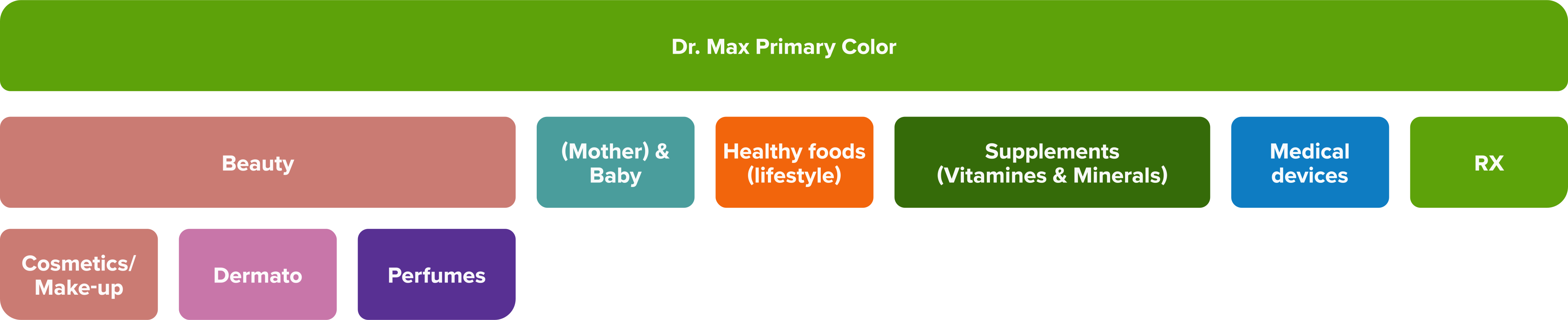
Color definition
Primary color – the main visual identifier for a product category, the most prominent color used in marketing materials and online platforms to create a stronger category association (eg. headers in brochures, shelf highlighters, website banners, badges,..).
Light shade - a lighter variant of the primary color, used predominantly as a background color to ensure readability and create a clean, spacious look while maintaining category consistency.
Dark shade – a darker variant of the primary color, primarily used for text and other elements requiring high contrast against lighter backgrounds, ensuring legibility and a cohesive visual hierarchy
APCA Contrast Guidelines
Non-text elements
- Lc 15: Minimum contrast for non-semantic elements to be discernible. Avoid for important items.
- Examples: Dividers, thick focus outlines.
Spot text
- Lc 30: Minimum contrast for placeholder text, disabled elements, or non-content text.
- Examples: Placeholder text, disabled element text, copyright text, mostly-solid icons.
Headlines
- Lc 45: Minimum contrast for large, heavy text like headlines
- Examples: Headlines, small outlined icons, fine-detail pictograms
Content Text
- Lc 60: Minimum contrast for non-body content text.
- Examples: Text larger than 24px and or larger than 19px in bold.
Body text
- Lc 75: Minimum contrast for columns of body text.
- Examples: Body text and block text.
Fluent Text
- Lc 90: Preferred level for fluent text and large areas of color.
- Examples: Long-form text, blog articles.
Further reading: https://ruitina.com/apca-accessible-colour-contrast/
Beauty
| Shade | Color | Print specifications |
|---|---|---|
| 25 | #fef6f5 | Pantone (print): P 75-1 C; CMYK (print): 0, 3, 4, 0 |
| 400 | #ca7b73 | Pantone (print): P 56-4 C; CMYK (print): 0, 39, 43, 21 |
| 600 | #8f4b47 | Pantone (print): P 56-14 C; CMYK (print): 0, 48, 50, 44 |
| Usage of colors in digital media | Non-text elements | Spot Text | Headlines | Content text | Body text* | Fluent text* | |
|---|---|---|---|---|---|---|---|
| White on primary | Color preview | ✓ | ✓ | ✓ | ✓ | ||
| Primary on white | Color preview | ✓ | ✓ | ✓ | |||
| Dark on light | Color preview | ✓ | ✓ | ✓ | ✓ | ✓ | |
| Light on dark | Color preview | ✓ | ✓ | ✓ | ✓ | ✓ |
Using any colour different than black for fluent or body text is not recommended.
Dermato-cosmetics
| Shade | Color | Print specifications |
|---|---|---|
| 25 | #fef6f8 | Pantone (print): P 75-1 C; CMYK (print): 0, 3, 2, 0 |
| 400 | #c876a9 | Pantone (print): P 81-2 C; CMYK (print): 0, 41, 16, 22 |
| 600 | #8f4571 | Pantone (print): P 82-5 C; CMYK (print): 0, 52, 21, 44 |
| Usage of colors in digital media | Non-text elements | Spot Text | Headlines | Content text | Body text* | Fluent text* | |
|---|---|---|---|---|---|---|---|
| White on primary | Color preview | ✓ | ✓ | ✓ | ✓ | ||
| Primary on white | Color preview | ✓ | ✓ | ✓ | |||
| Dark on light | Color preview | ✓ | ✓ | ✓ | ✓ | ✓ | |
| Light on dark | Color preview | ✓ | ✓ | ✓ | ✓ | ✓ |
Using any colour different than black for fluent or body text is not recommended.
Perfumes
| Shade | Color | Print specifications |
|---|---|---|
| 25 | #fef5fd | Pantone (print): P 75-9 C; CMYK (print): 0, 4, 0, 0 |
| 700 | #583093 | Pantone (print): P 96-8 C; CMYK (print): 40, 67, 0, 42 |
| 800 | #3f147c | Pantone (print): P 96-16 C; CMYK (print): 49, 84, 0, 51 |
| Usage of colors in digital media | Non-text elements | Spot Text | Headlines | Content text | Body text* | Fluent text* | |
|---|---|---|---|---|---|---|---|
| White on primary | Color preview | ✓ | ✓ | ✓ | ✓ | ✓ | ✓ |
| Primary on white | Color preview | ✓ | ✓ | ✓ | ✓ | ✓ | ✓ |
| Dark on light | Color preview | ✓ | ✓ | ✓ | ✓ | ✓ | |
| Light on dark | Color preview | ✓ | ✓ | ✓ | ✓ | ✓ | ✓ |
Using any colour different than black for fluent or body text is not recommended.
(Mother &) Baby
| Shade | Color | Print specifications |
|---|---|---|
| 25 | #f1faf8 | Pantone (print): P 134-9 C; CMYK (print): 4, 0, 1 , 2 |
| 400 | #4a9d9c | Pantone (print): P 126-4 C (5483 C); CMYK (print): 53, 0, 1, 38 |
| 600 | #0c696a | Pantone (print): P 126-8 C; CMYK (print): 89, 1, 0, 58 |
| Usage of colors in digital media | Non-text elements | Spot Text | Headlines | Content text | Body text* | Fluent text* | |
|---|---|---|---|---|---|---|---|
| White on primary | Color preview | ✓ | ✓ | ✓ | ✓ | ||
| Primary on white | Color preview | ✓ | ✓ | ✓ | |||
| Dark on light | Color preview | ✓ | ✓ | ✓ | ✓ | ✓ | |
| Light on dark | Color preview | ✓ | ✓ | ✓ | ✓ | ✓ |
Using any colour different than black for fluent or body text is not recommended.
Healthy food (lifestyle)
| Shade | Color | Print specifications |
|---|---|---|
| 25 | #fef6f3 | Pantone (print): P 75-1 C; CMYK (print): 0, 3, 4, 0 |
| 400 | #f2650c | Pantone (print): P 30-8 C; CMYK (print): 0, 58, 95, 5 |
| 600 | #a53d02 | Pantone (print): P 35-16 C; CMYK (print): 0, 63, 99, 35 |
| Usage of colors in digital media | Non-text elements | Spot Text | Headlines | Content text | Body text* | Fluent text* | |
|---|---|---|---|---|---|---|---|
| White on primary | Color preview | ✓ | ✓ | ✓ | ✓ | ||
| Primary on white | Color preview | ✓ | ✓ | ✓ | |||
| Dark on light | Color preview | ✓ | ✓ | ✓ | ✓ | ✓ | |
| Light on dark | Color preview | ✓ | ✓ | ✓ | ✓ | ✓ |
Using any colour different than black for fluent or body text is not recommended.
Supplements (Vitamins & Minerals)
| Shade | Color | Print specifications |
|---|---|---|
| 50 | #e7f5cc | Pantone (print): P 160-3 C; CMYK (print): 6, 0, 17, 4 |
| 600 | #356b09 | Pantone (print): P 156-8 C; CMYK (print): 50, 0, 92, 58 |
| 700 | #235106 | Pantone (print): P 156-16 C; CMYK (print): 57, 0, 93, 68 |
| Usage of colors in digital media | Non-text elements | Spot Text | Headlines | Content text | Body text* | Fluent text* | |
|---|---|---|---|---|---|---|---|
| White on primary | Color preview | ✓ | ✓ | ✓ | ✓ | ✓ | |
| Primary on white | Color preview | ✓ | ✓ | ✓ | ✓ | ✓ | |
| Dark on light | Color preview | ✓ | ✓ | ✓ | ✓ | ✓ | |
| Light on dark | Color preview | ✓ | ✓ | ✓ | ✓ | ✓ |
Using any colour different than black for fluent or body text is not recommended.
Medical devices
| Shade | Color | Print specifications |
|---|---|---|
| 25 | #f5f8fd | Pantone (print): P 99-1 C; CMYK (print): 3, 2, 0, 1 |
| 600 | #09629d | Pantone (print): P 107-7 C; CMYK (print): 94, 38, 0, 38 |
| 500 | #0d77ba | Pantone (print): P 106-7 C; CMYK (print):** 93, 36, 0, 24** |
| Usage of colors in digital media | Non-text elements | Spot Text | Headlines | Content text | Body text* | Fluent text* | |
|---|---|---|---|---|---|---|---|
| White on primary | Color preview | ✓ | ✓ | ✓ | ✓ | ✓ | |
| Primary on white | Color preview | ✓ | ✓ | ✓ | ✓ | ||
| Dark on light | Color preview | ✓ | ✓ | ✓ | ✓ | ✓ | |
| Light on dark | Color preview | ✓ | ✓ | ✓ | ✓ | ✓ |
Using any colour different than black for fluent or body text is not recommended.
RX
In online communication the official Dr. Max Green is modified due contrast & accessibility. Instead of defined HEX #78be20 (Pantone® 368c ), the #5DA20A is used for digital communication, excl. logo Dr. Max keeping always #78be20
| Shade | Color | Print specifications |
|---|---|---|
| 25 | #f8f9eb | Pantone (print): P 160-1 C; CMYK (print): 0, 0, 6, 2 |
| 400 | #5da20a | Pantone (print): P 369 C; CMYK (print): 43, 0, 94, 36 |
| 600 | #356b09 | Pantone (print): P 156-8 C; CMYK (print): 50, 0, 92, 58 |
| Usage of colors in digital media | Non-text elements | Spot Text | Headlines | Content text | Body text* | Fluent text* | |
|---|---|---|---|---|---|---|---|
| White on primary | Color preview | ✓ | ✓ | ✓ | ✓ | ||
| Primary on white | Color preview | ✓ | ✓ | ✓ | |||
| Dark on light | Color preview | ✓ | ✓ | ✓ | ✓ | ✓ | |
| Light on dark | Color preview | ✓ | ✓ | ✓ | ✓ | ✓ |
Using any colour different than black for fluent or body text is not recommended.